Office Tab for Windows
- By Extendoffice.com
- Trial version
- 18.00

Top Recommended Alternative

Technical
- Title
- Office Tab 18.00 for Windows
- Requirements
- Windows Vista
- Windows 7
- Windows XP
- Windows 8
- Language
- English
- Available languages
- Arabic
- Czech
- Danish
- German
- Greek
- English
- Spanish
- Finnish
- French
- Hindi
- Italian
- Japanese
- Korean
- Dutch
- Norwegian
- Polish
- Portuguese
- Russian
- Swedish
- Turkish
- Chinese
- License
- Trial version
- Latest update
- Author
- Extendoffice.com
- SHA-1
24b0994015db250f2edfacb8c7bdcec6e9d2624c
- Filename
- Office_Tab_V18.00.exe
Program available in other languages
Office Tab for Windows
- By Extendoffice.com
- Trial version
- 18.00
Changelog
We don’t have any change log information yet for version 18.00 of Office Tab. Sometimes publishers take a little while to make this information available, so please check back in a few days to see if it has been updated.
Explore apps






Related software

Microsoft Project Professional 2016
Project management program

Jaspersoft Studio
Jaspersoft Studio is the eclipse-based report designer for JasperReports and JasperReports Server. It is open source and free to use. With it, you can create sophisticated layouts that contain charts, images, sub-reports, crosstabs etc. Jaspersoft Studio allows you to access your data through JDBC, TableModels, JavaBeans, XML, Hibernate, CSV, and custom sources. You can then publish your reports as PDF, RTF, XML, XLS, CSV, HTML, XHTML, text, DOCX, or OpenOffice. Jaspersoft Studio was designed with a single goal in mind; to provide users with the features from Jaspersoft Report Editor, available as a port of iReport Designer. As Jaspersoft Studio has its foundations built upon the Eclipse platform, it is a more complete solution that allows users to extend its capabilities and functionality. Key features include: Repository explorer. Outline view. Report editing Area. Problems view. Designer palette. Properties view. Project explorer. Report State summary. Jaspersoft Studio has a multi-tab editor to work with. There are three different tabs: Design is the main tab selected when you open a report file and it allows you to graphically create your report. Source contains the JRXML source code for your report. Preview lets you run the report preview after having selected a data source and output format. Jaspersoft Studio is a comprehensive tool that offers a different perspective from that of iReport Designer. For those of you who have worked with Eclipse, you will be familiar with the user interface, while to new users the layout of the shown elements will appear somewhat different, but the functionality will remain. Looking for the Mac version of Jaspersoft Studio? Download Here
Microsoft PowerPoint 2010
Classic presentation tool with lasting value

Kingsoft Writer Free 2013
Kingsoft Writer Free 2013 is a free word processing app the has some well built, premium features that do well in matching Microsoft’s flagship offering, Word. It makes a good, free alternative to Microsoft Word, supporting all Word's file formats including .docx. Kingsoft Writer Free 2013 has an easy to use user interface, which makes it a good choice for complete beginners and has some very useful features for more advanced users. Additionally, it has many useful functions, including a built-in Word to PDF converter, automatic spell check, web layout view, etc. Key Features include: Free word processor paragraph adjustment. Paragraph Adjustment Tool. Multiple Document Tabs. Table Adjustment. Built-in Word to PDF Converter. Kingsoft Writer Free 2013 also provides a large number of table styles in order to help you insert colorful tables, and add some vibrancy to your data. All tables are easy to add and edit; you can quickly select, move tables, and add additional rows or columns, simply by clicking shortcut operations on the table. Overall, Kingsoft Writer Free 2013 is a great alternative to Microsoft Word. It allows you to easily create visually stunning documents and the interface is easy to use and will be familiar to anyone oho has even the most rudimentary knowledge of Office applications.

Gammadyne Mailer
Gammadyne Mailer Advanced Features

Celtx
Collaborative screenwriting tool

PDFChef
Comprehensive PDF Management with PDFChef

Kingsoft Writer Professional 2012
A Competent Microsoft Word Alternative

IP Camera Viewer
IP Camera Viewer: Gain Access to IP Camera Feeds

EnSuite-View
Productivity With En Suite-View

Kingsoft Spreadsheets Free 2013
Kingsoft Spreadsheets Free 2013 is free spreadsheet alternative to Microsoft's offering, Excel, which offers a wide range of easy-to-use features that will suit both beginners and advanced users, alike. Kingsoft Spreadsheets Free 2013 allows you to create professional looking spreadsheets and analyze data with minimal effort. With Kingsoft Spreadsheets Free 2013 you can open and save documents from a wide variety of formats, including the latest version of Microsoft Excel in addition to its own document format. Key Features include: Built-in spreadsheets / Excel to PDF converter. Data sorting and data filter. Multiple document tabs. Free spreadsheet auto filter. Document encryption. Kingsoft Spreadsheets Free 2013 allows you to use the built-in FREE PDF converter in order to easily convert documents created with Microsoft Office Excel (Excel 2003, Excel 2007, Excel 2010), and Kingsoft Spreadsheets into PDF format. The app also allows you to choose from 11 different types of charts to best convey what you want to express effectively, including Column chart, Bar chart, Line chart, Pie chart, XY chart , Area chart, Doughnut chart, Radar chart, Bubble chart, and Stock chart. You can also choose from custom charts as well. With Kingsoft Spreadsheets Free 2013 you can use a variety of Formulas to choose from. There is also a large number of functions that are provided, including Sum, Average, V lookup, Mid, TRIM, TEST, etc. Overall, Kingsoft Spreadsheets Free 2013 is well rounded spreadsheet app hat can rival most offerings on the market today. The interface is fairly standard and can be navigated by users of all levels of expertise. Supported input file formats include: Microsoft Excel (97/2000/XP/2003/2007/2010) *.xls, *.xlt and *.xlsx; Kingsoft Spreadsheets *.et and *.ett. Supported Output file formats include:: Microsoft Excel (97/2000/2003/2007/2010) .xls, .xlsx, .xlsm, .xlt, .csv, Kingsoft *.et and *.ett.
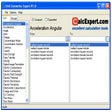
Unit Converter Expert
Unit Converter Expert - Convert between more than 2,100 measurement units
Last updated

2007 Microsoft Office suite Service Pack 3
Free security and performance boost for legacy Office
Microsoft Publisher
Microsoft Publisher: Perfect for businesses

WPS Office - Free Office Suite
One hub for everyday office files

Apache OpenOffice
Reliable office tools that truly endure

Icecream PDF Editor
Lightweight PDF editor for everyday needs

AnyDesk
Effortless remote access with AnyDesk

Adobe Acrobat Reader DC
Reliable PDF viewing and annotation for all users

CCleaner Free
Cleaning and optimization made simple

Avast Free Antivirus
Free and powerful security tool

FL Studio
A professional and versatile digital audio workstation

WhatsApp Messenger 64-bit for PC Windows
Seamless communication across all devices

CapCut
Free video editing app