
Simple protection for portable private files
USB Safeguard is a portable security tool designed to protect private files stored on removable drives. It uses password protection and AES 256-bit encryption to create a protected virtual drive, giving users a simple way to keep sensitive documents away from unauthorized access. Its focus on portability makes it relevant.
USB Safeguard offers automatic locking when users become inactive or unplug the drive, adding protection during everyday use. Its setup and ability to run directly from removable storage make it useful for people who handle confidential files. The approach remains simple enough for less experienced users while offering strong encryption.
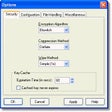
USB Safeguard's strength is its simple protection method. The program creates a password-protected virtual drive using AES 256-bit encryption, allowing private files to remain inaccessible without the correct password. It supports USB flash drives, external hard drives, SSDs, and memory cards. Automatic locking after inactivity and immediate locking when the drive is unplugged also make the protection practical for everyday file handling.
What makes this file protection tool useful
Setup is reasonably straightforward, although the drive must be formatted as NTFS during initial configuration, so existing files should be backed up first. Once configured, the program runs directly from the removable drive without requiring installation for normal use. Performance is lightweight, and the small footprint suits portable storage well. Compared with VeraCrypt, however, the feature set is more focused and less flexible.
The biggest limitations concern convenience and access. The free version is limited to drives up to 4GB, while larger drives require the trial or paid version. Forgotten passwords cannot be recovered, which makes careful password management essential. The software also has fewer advanced options than broader encryption tools. Still, its focused design, portable operation, and automatic locking make it useful for basic private-file protection.
A practical choice for portable file security
USB Safeguard is a worthwhile choice for users who need straightforward protection for private files on removable storage. AES 256-bit encryption, password access, automatic locking, and portable operation provide a solid basic security package without unnecessary complexity. The storage limit on the free version and lack of password recovery reduce its flexibility, but users seeking simple, focused file protection should find it dependable and easy to manage.
Pros
- AES 256-bit encryption protects private files
- Automatic locking improves everyday security
- Portable operation requires little setup
- The focused design is easy to manage
Cons
- The free version has a 4GB drive limit
- Forgotten passwords cannot be recovered
- Initial setup requires NTFS formatting
- Advanced encryption options are limited