
A tiny clock that stays visible
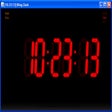
DesktopDigitalClock puts a readable time overlay on the desktop for people who want a clock visible while working. It runs as a portable ZIP download, so it can be started quickly without a heavy setup. You can set transparency and pick themes so it blends into different wallpapers, then toggle seconds display when you need tighter timing at all.
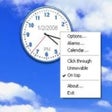
DesktopDigitalClock keeps control close with tray menu settings, letting you adjust size, colors, and position in a few clicks. It also offers an installer or portable build and publishes SHA-256 hashes on the download page for quick file verification before launching.
DesktopDigitalClock is built for quick visibility: free positioning lets you drag the clock where it won’t block your workspace, and always-on-top mode keeps it readable over busy windows. For clarity, font selection and color customization make the digits easy to scan at a glance. The controls stay simple, and low CPU footprint helps it sit quietly during long sessions. Once placed, it stays put and remains readable.
Keeping time visible during focused work
Personalization stays practical once you start tweaking: size scaling helps match high-DPI screens, and position memory keeps the overlay where you left it after a reboot. It’s the kind of utility that works best when you set it once and stop thinking about it. If you want a full widget panel, Rainmeter is a bigger ecosystem, while classic clock apps focus more on analog skins than quick readability.
On performance, the clock stays responsive even when the system is under load, mostly because it does one job and avoids background extras. The download sizes are small, and the tiny footprint makes it a safe add-on for older machines and lab boxes. It’s still worth pinning expectations: it shows time cleanly, adds date display, but won’t replace a full dashboard. For most desks, that restraint feels intentional.
A clean clock for any desktop
DesktopDigitalClock fits users who want a simple, readable clock that stays visible without turning the desktop into a widget wall. It offers quick customization, sensible placement control, and a lightweight runtime that won’t distract from real work. Download options include both installable and portable packages, making it easy to deploy on a main PC or a spare system. For straightforward time visibility, it’s an easy recommendation.
Pros
- Stays readable over busy windows
- Keeps resource use low during long sessions
- Offers flexible sizing and placement control
Cons
- Offers limited depth beyond basic time display
- Needs occasional tweaks for dynamic desktop setups