
List, format, and print folder contents for free
Directory List & Print is a free, lightweight software for Windows designed to list, print, and export folder and directory contents with files in the simplest way possible. The office application allows users to format, filter, and save directory lists to multiple file formats, or open them directly in Microsoft Office Word and Excel.
Beyond basic text output, Directory List & Print extracts metadata such as image Exif tags, audio details, and document properties. Whether you need a quick inventory of media files or structured data for documentation, this program provides a straightforward approach to directory management on Windows systems.
The Directory List & Print software enables you to list, print, and export all files in a folder, including subfolders, with minimal effort. You can add the program to the Windows Explorer context menu to directly access and list selected directory structures. This integration saves time when navigating large directory trees, so you can capture precise folder contents instantly without manually browsing through nested subdirectories.
Directory management made simple
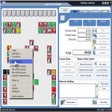
The program extracts over 100 meta tags from image, audio, video, and PDF files, displaying details like resolution, artist, duration, and creation date. Numerous filter options let you refine your file lists by name, size, type, or date. While these features offer great flexibility, the user interface can feel cluttered and overwhelming for beginners due to the sheer density of configuration options available on a single screen.
Once a directory list is generated, you can open it directly in Excel or Word, or export it as a PDF, HTML, or XML table. The software also allows you to directly copy, move, or delete listed files while preserving original creation dates. Although the freeware version handles most standard tasks efficiently, advanced automation features and certain direct file manipulation tools are locked behind the Pro paywall.
A practical tool for file management
All in all, Directory List & Print is an efficient utility for anyone needing to catalog, filter, and export Windows directory contents. Its strong integration with system contexts and versatile output formats make file inventory tasks remarkably simple. While the dense interface and limitations on advanced features require some getting used to, the free version remains a reliable addition to any user's productivity toolkit.
Pros
- Quick context menu integration
- Extracts extensive file metadata
- Multiple export formats
- Seamless Microsoft Office integration
Cons
- Dense and cluttered user interface
- Advanced features locked behind Pro paywall