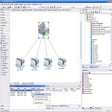

Customizable environment for Arduino development
CodeBlocks Arduino IDE is a community-supported variation of the Code::Blocks IDE designed for Arduino programming. It provides a development environment that integrates the Arduino compiler and libraries with Code::Blocks’ project management tools. The IDE enables users to compile and upload code to Arduino boards and offers basic support for organizing sketches and libraries. While it does not match the official Arduino IDE feature set entirely, CodeBlocks Arduino IDE delivers a configurable platform for developers seeking more control over their development workflow.
The IDE supports syntax highlighting, autocompletion, and code suggestions for Arduino C/C++ programming, helping streamline the coding process. Users can manage multiple sketches within projects and organize libraries for easier reuse. Compilation and uploading are handled through the included Arduino toolchain, while a basic serial terminal may be available for communication with connected boards. Advanced debugging features, such as breakpoints or hardware debugging, are limited or not consistently included, reflecting the community-driven nature of the project.
Streamlined coding and project management
Integration and workflow flexibility
CodeBlocks Arduino IDE leverages Code::Blocks’ extensibility, including optional version control integration and customizable editor settings. Users can adjust syntax highlighting, code formatting, and interface layout to suit personal preferences. The IDE primarily targets Arduino development but does not provide native support for cloud integration, visual programming interfaces, or advanced hardware debugging probes. While most historical builds were distributed for Windows, the underlying Code::Blocks framework is cross-platform, allowing potential adaptation for other operating systems with the appropriate configuration.
Final thoughts
CodeBlocks Arduino IDE offers a configurable and extensible environment for Arduino development that is most useful to experienced C/C++ developers familiar with Code::Blocks. Its strengths include code organization, compiler integration, and customization options. However, the project is community-maintained, with limited modern updates, and advanced debugging or integrated serial monitor features may be inconsistent. For developers seeking a flexible, open-source platform for Arduino projects, CodeBlocks Arduino IDE provides a capable, if specialized, solution.
Pros
- Integrates Arduino toolchain with Code::Blocks IDE
- Supports code completion, syntax highlighting, and project management
- Configurable interface and workflow customization
- Community-supported and open-source
Cons
- Limited or inconsistent advanced debugging support
- Serial monitor functionality may vary across builds
- Community-driven with no formal maintenance or updates
- Not fully aligned with official Arduino IDE features