
Installed through our safe & fast downloader ()
Filehippo

Safe shield iconSafe Downloader

The Safe Downloader downloads the app quickly and securely via FileHippo’s high-speed server, so that a trustworthy origin is ensured.
In addition to virus scans, our editors manually check each download for you.

Advantages of the Safe Downloader

  • Malware protection informs you if your download has installed additional unwanted software.
  • Discover additional software: Test new software that are waiting to be discovered in the downloader.
  • With us you have the choice to accept or skip additional software installs.

Editors' Review · February 23, 2026

Samurize for Windows Desktop Dashboards

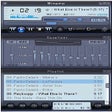
Samurize is a desktop customization and system monitoring utility for Windows that lets you place live stats directly on your desktop. Instead of fixed widgets, it uses editable layouts called configs, so you control what appears, where it sits, and how it looks. The result can be a minimalist performance panel or a full dashboard that stays visible while you work.

That freedom is also the trade-off. Setup takes time, and the interface feels dated compared with newer Windows desktop widgets tools. Samurize also sits in a legacy spot, with limited modern development and fewer current configs. Still, it stays lightweight once configured for enthusiasts who build layouts by hand.

Samurize centers on building your own desktop panels. A config can show CPU, memory, disk, and network activity using text, bars, graphs, and images, then layer everything into a clean overlay. For advanced setups, scripts and plugins can pull extra data sources. This flexibility is the main reason power users keep it around. You can tune fonts, colors, and positioning.

A Build Your Own Monitoring Workspace

The workflow splits into an editor for designing configs and a client that runs them, which helps keep resource use low during daily work. Monitoring can stay visible while games or apps run full-screen. However, the learning curve stays real. Building a polished dashboard takes trial and error, and ready-made configs vary in quality especially if you want many meters.

Samurize also carries a clear legacy status. The interface looks old-school, and some add-ons rely on data sources that no longer behave consistently on modern Windows setups. Basic monitoring can still run fine, but long-term reliability depends on your config and plugins. People who want a simpler, modern experience often prefer alternatives and can spend time troubleshooting small quirks today.

Who Samurize Still Fits Best

Samurize fits users who treat their desktop like a control room and care more about customization than convenience. It delivers a lightweight system monitor that can look exactly the way you want, with configs that range from simple readouts to complex dashboards. The trade-offs are a dated interface, a setup process that takes time, and the realities of legacy software on modern systems. For tinkerers, it remains a fun, capable tool. For everyone else, a newer widget platform feels easier.

  • Pros

    • Deep desktop customization through configs
    • Lightweight monitoring once set up
  • Cons

    • Dated interface and legacy status
    • Steeper learning curve and occasional plugin quirks

Enlarged image for Samurize
Samurize 0/1

Technical

Title
Samurize 1.64.3 for Windows

Requirements
  • Windows XP
  • Windows 2003
  • Windows Vista
  • Windows 2000
Language
English
Available languages
  • German
  • English
  • Spanish
  • French
  • Italian
License
Free
Latest update
Author
Samurize.com
SHA-1
f145f99a68ee4c0c535611f15d7e5aa87ef5e08a
Filename
samurize_1.64.exe

Program available in other languages


Bugfixes:- fixed a bug with Meter x/y width/height toggle arrows not updating the meters correctly.- fixed a bug with Import Export form not loading language files- fixed a bug with Rulers not updating when using the Mouse Scroll Wheel- fixed a bug with icons not displaying correctly in the config editor- fixed a bug with the input wizard displaying the wrong form- fixed a bug with the reconnection logic on Remote Meters- fixed a bug with Access violations on drag and drop in the Meter List- fixed a bug that scroll wasnt working when drag and drop- fixed numerous bugs in instance manager when starting clients and servers- fixed a bug with the display box on the Console Meter- fixed a bug with the displaying of the glass effect on the config editor and Instance Managerplus currently removed all glass effect from the client- fixed a couple of bugs with the console meter constaintly running process- fixed a bug with WM_SAM_GET_SAMURIZE_DIRECTORY- fixed a bug with totalNetCollector when an adapter is disabled and reenabled- fixed an infinite loop within the Samurize Server- fixed a problem with the Options dialog box in the Samurize Server- fixed a bug with the Meter Maths loading new style meter namesChanges/Improvements:- Vista Support- ToolTips can now be used with mouse buttons (single and double click)- updated DTD for all the new xml sections in every meter type.- Additional input method using Scripts- Console Meters can now run constantly running console programs and get the output- Updated the Copy meter logic so the new meter names are not so long- Instance Manager supports groups- Instance Manager maintains the Z-Order of instances when loaded (if pin to desktop, dock or normal window behaviour is used)- Improved the catching of Show Desktop for pin to Desktop and pin to Desktop compat modes.- Improved the Perfmon gathering of data to reduce the number of queries.- Added rename to the instance manager for groups and instances.- Meter maths will return a NOT FOUND on string maths if the meter is not available.- IMAP4 support for the mail meter- Total Net Collector changes unit dynamicallyNew Features:- Logging can be enabled for the clients and config editors

Can you help?

If you have any changelog info you can share with us, we’d love to hear from you! Head over to our Contact page and let us know.

Explore apps

Related software

Last updated