
Lightweight 3DS-style simulator for basic testing
R4 3DS Emulator is a simple Windows program designed to mimic the look and layout of a Nintendo 3DS system. It is often used to test small homebrew files or explore a 3DS-style interface on a computer. While the software is free and easy to install, it does not feature full hardware emulation. This limitation shapes it more as a simulator than an alternative to dedicated emulation tools.
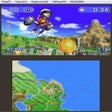
The program presents a dual-screen layout and a basic menu that resembles the handheld interface. This setup gives users a familiar environment to open lightweight homebrew experiments. Although it offers an accessible starting point, the name can mislead newcomers into expecting full 3DS game compatibility. These expectations often contrast with the tool’s limited scope and modest performance.
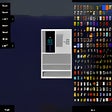
R4 3DS Emulator focuses on usability by providing a straightforward menu that allows users to browse local files. The interface imitates a cartridge-insertion workflow that helps users test small applications within a recognizable layout. Its lightweight design makes it accessible even on older systems and supports quick experimentation without complex settings. These qualities form the main strengths highlighted by users who value convenience and simplicity.
A simple interface for homebrew-style exploration
Performance stays modest, with the software acting more like a visual shell than a full emulator. It lacks the ability to run commercial 3DS titles or emulate the hardware that such games require. This functional limitation also prevents the program from matching the capabilities of established emulators built specifically for DS or 3DS environments. As a result, it serves a narrow purpose centered on casual testing.
Compatibility varies depending on the files loaded, and the program has no official support channels or ongoing updates. Since it is not affiliated with R4 flashcart manufacturers, it should not be viewed as an official utility. These factors make it better suited for users who simply want to experiment with a 3DS-style interface rather than play full games.
A niche option for basic, low-impact use
R4 3DS Emulator delivers a lightweight simulator for users who want to explore a 3DS-inspired interface or test small homebrew files. Its simplicity and free access are appealing, though the lack of true emulation and limited functionality define its narrow role. It works best as a casual tool rather than a practical way to experience full Nintendo 3DS gameplay.
Pros
- Lightweight and easy to install
- Familiar 3DS-style interface for simple testing
Cons
- Cannot run commercial 3DS games
- Limited functionality and no official support