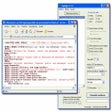

Managing EPUB metadata made significantly easier
EPUB Metadata Editor is a practical book, e-reader, and utility tool designed to manage EPUB files through metadata editing, library organization, and file correction. It helps users fix titles, authors, and details, making digital collections easier to maintain while keeping the workflow focused, lightweight, and purpose-driven.
What makes EPUB Metadata Editor appealing is its focus on document management, metadata control, and ease of use. This app does not act as a full ebook editor but instead specializes in organizing file information efficiently. This narrow scope keeps processes simple, though it may feel limited for users.
One of the strongest aspects of EPUB Metadata Editor is how efficiently it handles metadata updates. The software allows users to modify details such as titles, authors, publishers, and descriptive information without needing to rebuild entire files. This focused functionality saves time when managing collections. The downside is that users working with uncommon metadata requirements may occasionally encounter limitations compared to more comprehensive ebook management applications.
Streamlined control for EPUB library editing
The software adopts a straightforward approach that prioritizes productivity, document management, and organization. Menus and editing tools are generally easy to understand, allowing users to focus on updating metadata rather than learning complicated workflows. This simplicity makes routine tasks more approachable. However, newcomers unfamiliar with EPUB metadata standards may still need a brief learning period to fully understand the purpose of certain fields and options.
As a dedicated books and e-readers utility, the software performs its intended role effectively. Managing metadata across ebook collections becomes significantly more convenient when information is organized consistently. Performance remains dependable during normal use, and the focused design avoids unnecessary distractions. That said, users seeking broader ebook editing capabilities may eventually need supplemental tools for content modification, formatting adjustments, or more advanced library management tasks.
A useful tool for an organization
EPUB Metadata Editor succeeds by focusing on a specific task and performing it well. Its efficient metadata editing, approachable interface, and useful organization features make it a worthwhile addition to many ebook workflows. While advanced content editing is outside its scope and some specialized metadata needs may require additional tools, the software remains easy to recommend for managing EPUB collections.
Pros
- Efficient metadata editing
- Straightforward interface design
- Helpful collection organization
- Dependable everyday performance
Cons
- Limited content editing
- Narrow specialized focus
- Some metadata limitations