
Focused recovery for virtual machine data
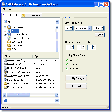
VMFS Recovery Wizard is a technical recovery utility built for users who need to retrieve files from damaged or inaccessible VMware storage. It focuses on VMFS data recovery, helping admins and power users approach lost virtual machine content with a guided process instead of manual disk-level repair work.
VMFS Recovery Wizard also suits IT teams handling deleted partitions, formatted volumes, or crashed virtual disks. With deleted data recovery, formatted disk recovery, and partition scanning, it offers a clear route for checking recoverable content while keeping the main goal centered on saving important files to a safer location.
VMFS Recovery Wizard is designed for cases where a datastore, partition, or virtual disk becomes unreadable after deletion, formatting, corruption, or a failed system event. Its raw recovery gives users another route when normal scans do not find enough structure, while multiple file system support helps with mixed environments. The workflow is guided, but users still need backups, stable drives, and realistic expectations before making changes.
How VMFS recovery tools handle virtual disks
Compared with DiskInternals Partition Recovery or UFS Explorer, this tool feels more approachable for admins who want a direct wizard instead of a dense forensic workspace. The recoverable file preview helps confirm what was found before export, and the advanced search filter saves time in large images. It is less suited to users who need broad RAID analysis or deep lab-grade diagnostics during complex failures.
Performance depends on disk size, damage level, and destination speed, so larger virtual drives can take serious time to scan. split and flat disk support helps with common VMware storage layouts, and saving recovered files to a separate location keeps the source safer. The experience is practical for technical recovery work, but it should not replace tested backups or proper incident handling after an outage.
A useful option for VMware recovery
VMFS Recovery Wizard is best for IT users, consultants, and admins who need a guided way to inspect damaged VMware storage and save important files elsewhere. It is easy to recommend for focused virtual machine recovery when the disk is still readable enough to scan. For severe infrastructure damage, professional recovery help and verified backups should still be part of the plan for safer results.
Pros
- Clear workflow for VMware storage recovery
- Helpful for deleted, formatted, or damaged disks
- Saves time when searching large images
- Good fit for admins and consultants
Cons
- Large virtual drives can scan slowly
- Severe failures may need professional help
- Not a replacement for tested backups
- Less ideal for broad RAID diagnostics