
Technical
- Title
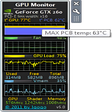
- GPU Monitor 12.9 for Windows
- Requirements
- Windows 7
- Windows Vista
- Windows 8
- Windows XP
- Language
- English
- Available languages
- English
- Spanish
- French
- Portuguese
- Russian
- Turkish
- Chinese
- License
- Free
- Latest update
- Author
- Igor Bushin
- SHA-1
7a8834bd400be320ae902deb83033c3fcd675ffd
- Filename
- GPU_Monitor_V12.9.zip
Program available in other languages
Changelog
We don’t have any change log information yet for version 12.9 of GPU Monitor. Sometimes publishers take a little while to make this information available, so please check back in a few days to see if it has been updated.
Can you help?
If you have any changelog info you can share with us, we’d love to hear from you! Head over to our Contact page and let us know.
Explore apps
HP LaserJet 1100 All-in-One Printer series drivers
HP Pavilion g6 1a52nr Notebook PC Driver
GSmartControl
Catalyst Drivers Download Utility
Braina
SD Card Recovery Pro
RK Launcher
HP Photosmart Plus Printer B210b drivers
WholeClear EML to NSF Converter
DataToUS Format Recovery
Bandwidth Vista
Advanced Disk Space Monitor










Related software
HWMonitor
Comprehensive hardware monitoring for Windows
X Live Wallpaper
A stunning way to personalize your desktop
SpeedFan
Monitor and control fan speeds and temperatures
iSpy
Smarter video feeds
OCCT
Maximize Your PC Performance with OCCT
Xbox Game Bar
Free Microsoft gaming overlay
f.lux
f.lux is a really handy tool that allows you to adjust the colour temperature on your display. If you stare at a screen for too long, then the glare from the display begins to hurt your eyes. To start with, turning down your monitor's brightness may help you, but brightness is not the really issue. The colour temperature is what causes the problems. Most computer screens emit a bluish light, which looks great in daytime, but it becomes uncomfortable to look at when the sun dips below the horizon. Not only can your screen become uncomfortable to look at, it can also affect your sleep patterns*. F.lux works by calculating the approximate sunset time for your location. At sunset, your computer screen will mimic nature, gradually warming up the colours. This, in turn, blends in better with the surrounding light. The app is very easy to navigate and configure in a few clicks. the adjustments can be made with sliders across the main window, which alter the daytime and night time calibrations. If you spend a large amount of time looking at your computer screen, then f.lux is definitely something that you should check out. *There has been research which suggests reading on a tablet for a couple of hours before you go to sleep can delay your sleep pattern by approximately an hour. Looking for the Mac version of f.lux? Download Here
EVGA Precision X1
Optimize Your NVIDIA Graphics with Precision X1
Cudo Miner
Comprehensive Management for Crypto Miners
Process Explorer
See more of your computer processes
FanControl
Free Windows fan management program
System Monitor II
Monitor system performance in real time











Last updated
TransMac
Reliable access to Mac drives for Windows users
Game Fire
Free Windows game performance booster
Win32 Disk Imager
Comprehensive Review of Win32 Disk Imager Utility
Disk2vhd
From physical to virtual
Glary Utilities Portable
Handy Pocket Toolkit for PC Maintenance
AOMEI FastRecovery
Efficient Data Recovery with AOMEI FastRecovery
Auto Dark Mode
Auto Dark Mode: Effortless Theme Switching for Windows
Argente Utilities
Argente Utilities: Improve your computer's security and performance
Apeaksoft iOS Unlocker
Free iPhone unlocker
XSplit VCam
XSplit VCam: Advanced Background Removal Tool
Free USB Guard
Safely Remove a USB Drive From Your Computer

FL Studio
A professional and versatile digital audio workstation









Latest version
GPU Monitor 13.9
Older versions
View morePopular in System Tuning & Utilities

WinRAR 64-bit

WinRAR 32-bit
CCleaner Free
WinBox
Recuva

DriverPack Solution Online
3uTools

DAEMON Tools Lite
TeraCopy

HP USB Disk Storage Format Tool




