
A free tool for HDR photos
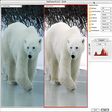
Luminance HDR is a photography editing tool for users who want richer exposure control without buying a full editing suite. It focuses on HDR image creation, helping photographers combine bracketed shots into one image that holds more highlight and shadow detail for landscapes, interiors, product photos, and creative editing work.
Top Recommended Alternative

Luminance HDR also suits tech-savvy users who prefer open-source control over one-click mobile filters. With exposure fusion, batch processing, and HDR format support, it gives careful shooters room to test natural or dramatic results while keeping the workflow practical for still-photo projects, web output, print preparation, and long-term image experiments.
How HDR editors improve photo detail
Luminance HDR keeps the editing process focused on building high dynamic range images from multiple exposures. Its alignment tools help reduce small framing differences between source shots, while anti-ghosting can limit movement artifacts from people, trees, or handheld capture. The workflow is useful for careful photographers, though first-time users may need patience because choosing operators and settings can change the final image quite strongly overall.
Compared with Photomatix Pro or HDR Efex Pro, the app feels more technical and less guided, but it gives users enough control to avoid preset-heavy results. RAW file support helps preserve sensor data before compression, and preview controls make it easier to compare mapping choices. Some settings can feel dated, yet the open approach rewards users who prefer manual tuning over automatic styling alone today.
Performance depends on image size, file type, and the number of exposures being merged. Post-processing gamma control and saturation adjustment help finish tone-mapped results before export, while common output formats make the final image easy to move into other editors. Large RAW sets can take time, especially on modest hardware, so organized folders and realistic media expectations make the experience smoother during longer editing sessions overall.
A capable choice for HDR editing
Luminance HDR is a strong pick for photographers who want free, flexible control over exposure blending and tone shaping. It works best for users willing to learn settings, test different outputs, and manage larger image sets carefully. Casual editors may prefer simpler tools, but this software remains valuable for detailed photo experiments, web-ready exports, and serious high dynamic range projects without subscription pressure today overall.
Pros
- Supports detailed exposure blending.
- Gives users flexible manual control.
- Works well for photo experiments.
- Avoids subscription-based editing costs.
Cons
- Takes patience to learn settings.
- Large RAW sets can take time.
- Less guided than paid alternatives.
- Some controls may feel dated.