
A Visual Upgrade for Dock Style App Launching
ObjectDock, developed by Stardock, adds a customizable, animated dock to Windows for quicker access to apps, folders, and shortcuts. It can act as a primary launcher and, for some setups, reduce reliance on the standard taskbar rather than fully replacing Windows system elements. The freemium approach covers core docking features for free, while the paid edition adds deeper customization and convenience features such as system tray support.
ObjectDock focuses on a customizable dock that changes how shortcuts and running apps are accessed from the desktop. Skins, icon sizing, and animation effects help tailor the dock’s look, while positioning and auto-hide options keep it out of the way when not needed. This flexibility can make the desktop feel cleaner and more organized, although the visual effects lean more toward personalization than essential functionality.
Customizable Interface That Engages
Efficient Docking With Docklets and Add Ons
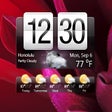
The dock runs smoothly for everyday use and typically stays light on system resources once configured. ObjectDock also supports docklets, which add small utilities directly to the dock such as weather and clock-style widgets. The free edition handles basic launching and organization, but some higher-end features are reserved for the paid version, including system tray integration and expanded docking options that make the dock more practical as an everyday hub.
Windows Focused Compatibility and Setup Scope
ObjectDock is designed for Windows and installs as a desktop enhancement rather than a system replacement. Integration stays focused on launching and organizing items, not connecting to third-party services or automating workflows. The program works best for users who want a dock-style layout for frequently used tools, and it can run alongside existing Windows navigation. Some features require the paid edition, so the free version can feel limited if the goal is to centralize everything into one dock.
Balanced Visual Enhancement With Feature Limits
ObjectDock stands out for its animated presentation, strong customization, and quick access to commonly used apps. The dock can streamline day-to-day launching while keeping the desktop visually tidy through skins, auto-hide, and docklets. The biggest trade-off is that key convenience features such as system tray support sit behind the paid tier, and the overall value depends on whether a visual launcher meaningfully improves your workflow.
Pros
- Flexible customizable dock with skins, animations, and auto-hide options
- Supports docklets like weather plus quick launching from a single hub
Cons
- System tray integration and other advanced options require the paid edition
- Primarily a visual launcher, with limited deeper integration beyond shortcuts and organization