
HTC Home for Windows Review
Craving a bit of HTC style for your PC? HTC Home for Windows is a free version of the distinctive HTC clock for your Windows computer. If you're a devoted HTC user, you're probably a fan of the fun clock/weather combo that came as default on your mobile device. Well, HTC Home for Windows brings the widget to your desktop, with a nicely designed, customizable version for the PC.
Top Recommended Alternative
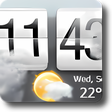
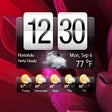
HTC Home for Windows has good configuration settings - you can pick your local city for the weather, choose what unit temperature is shown, and pick from one of 4 widget sizes. HTC Home for Windows displays the time and date, your location, the current weather, and a 5-day forecast. What makes HTC Home for Windows so attractive, apart from the distinctive HTC clock, is the animated weather changes. These animations can be enabled or disabled, which is a good thing - even though they are really nicely animated, cloudy/rainy weather can really obscure the other information!
HTC Home for Windows is a lovely time/weather widget that will look good on any desktop.
Pros
- Attractive, customizable clock and weather widget.
- Displays current weather and a five-day forecast.
- Animated weather effects enhance visual appeal.
- Configurable settings for location and units.
- Four widget sizes accommodate different screen setups.
Cons
- Lacks advanced weather details.
- No calendar integration or reminders.
- Limited customization beyond size and location.
- Only available for Windows operating systems.
- No mobile or web app companion.