
Precise FSB Control for Legacy Windows PCs
SetFSB, developed by abo, is a lightweight Windows overclocking tool that adjusts a system’s Front Side Bus (FSB) frequency from within the operating system. It targets users who want hands-on FSB overclocking rather than BIOS-only tuning. Compatibility depends on the motherboard’s PLL clock generator, so it is not a universal solution. Some releases are distributed as freeware while others use a registration model, depending on the source and build.
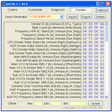
SetFSB provides manual control over Front Side Bus frequency, letting advanced users raise or lower the base clock in small steps. Changing FSB can increase CPU and memory clocks indirectly, depending on the system’s multipliers and dividers, which makes the tool useful for benchmarking and fine-tuning on supported hardware. A key limitation is that SetFSB requires selecting a supported PLL or clock generator type. Unsupported boards do not respond.
Direct Adjustment for CPU and Memory Tuning
Standalone Utility With a Technical Workflow
The app runs as a standalone program without add-ons or deep integration with other tools. A simple, functional interface fits its purpose, but the workflow stays technical because users need to identify the correct motherboard clock generator before making changes. That learning curve counts as a real trade-off, especially compared with overclocking utilities that bundle monitoring and guidance. This focus suits enthusiasts who already understand low-level system tuning.
Hardware Compatibility and Stability Risks
SetFSB relies on a compatible motherboard that exposes controllable FSB behavior, which also means it makes the most sense on older, FSB-based platforms. Administrator permissions are often required for hardware-level adjustments. Stability varies by system, and aggressive settings can trigger freezes, crashes, or boot issues, so careful incremental changes matter. The program itself stays light on system resources, but it does not provide voltage controls or built-in temperature monitoring.
Focused FSB Tweaking for the Right Hardware
SetFSB stays narrowly focused on FSB frequency adjustment for Windows users working with compatible, typically older hardware. That specialization is the main strength because it offers direct control when the motherboard supports it. The same specialization is the constraint because broad compatibility, modern platform relevance, and all-in-one safety tooling are not part of the package. It fits experienced tweakers who already know their board’s clock generator and limits.
Pros
- Direct Front Side Bus frequency control inside Windows
- Useful for incremental tuning and benchmarking on supported systems
Cons
- Limited compatibility because it requires a supported PLL clock generator
- No built-in monitoring or voltage controls, so stability management stays manual