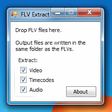
FLV Extract for Windows
- By J.D. Purcell
- Free
- 2.2.1.2
Related software
Allok Video Converter
Reliable tool for converting multiple video formats
HD Video Converter Factory Pro
Wonderfox HD Video Converter Factory Pro is a powerful, yet easy-to-use HD video conversion app. With it you can convert videos to 200+ popular formats and devices such as .MKV, .MP4, .AVI, .H264, .MTS, .M2TS, .FLV, .SWF, .HTML5, .WEBM, .TOD, .VOB, iphone7, iPhone 6S(Plus), iPhone 6(Plus), iPad Pro, iPad Air, iPad mini, Apple TV, Samsung GALAXY series, Android Smart, Curved 8K/4K TV, UHD TV, Surface, BlackBerry, PS4, Xbox One and more. Wonderfox HD Video Converter Factory Pro supports Multi-CPU and Hyper Threading, and offers up to 30x real time video converting speed. Wonderfox HD Video Converter Factory Pro uses exclusive optimization technique and produces sharp, crystal clear pictures. It completely avoids any disproportionate aspect ratios and dull colors in the converted media. The app also allows you to extract tracks and audio from any video. Moreover, it can convert audio between a wide range of formats. Such as MP3, AC3, AAC, OGG, WMA, M4R, WAV and more. In addition to the powerful converting function, it also allows you to perform basic video editing as well. You can undertake operations such as merge multiple videos; trim and crop video; add special effects to video (mosaic, blur, sharpen, emboss, noise, old film, etc. Overall, Wonderfox HD Video Converter Factory Pro is a useful tool for those who need the basic features and operations of a video conversion app, without power features. It is relatively lightweight, easy to use and has a good level of supports for various file types.
Avidemux
The free video editor Avidemux comes with a well selected feature set to get your cutting, filtering and encoding tasks done. It reads and writes many file types (AVI, DVD, MPEG, MP4, ASF, MKV) and comes with a variety of common codecs and filters. Avidemux automates your tasks by creating projects and putting them into the job queue. Features: Non-linear video editing Apply filters and effects Transcode into various formats Insert or extract audio streams Subtitle processor Project system Powerful scripting capabilities Graphical or command line interfaces Video encoders: MPEG-4 AVC, XviD, MPEG-4 ASP, MPEG-2 Video, MPEG-1 Video, DV, ... Audio encoders: AC-3, AAC, MP3, MP2, Vorbis, PCM, ... Container: AVI, MPEG-PS/TS, MP4, MKV, FLV, OGM, ...

Wonderfox HD Video Converter Factory Free
Wonderfox HD Video Converter Factory Free is a powerful, yet easy-to-use HD video conversion app. With it you can convert videos to 200+ popular formats and devices such as .MKV, .MP4, .AVI, .H264, .MTS, .M2TS, .FLV, .SWF, .HTML5, .WEBM, .TOD, .VOB, iphone7, iPhone 6S(Plus), iPhone 6(Plus), iPad Pro, iPad Air, iPad mini, Apple TV, Samsung GALAXY series, Android Smart, Curved 8K/4K TV, UHD TV, Surface, BlackBerry, PS4, Xbox One and more. Wonderfox HD Video Converter Factory Free supports Multi-CPU and Hyper-Threading, and offers up to 30x real time video converting speed. Wonderfox HD Video Converter Factory Free uses exclusive optimization technique and produces sharp, crystal clear pictures. It completely avoids any disproportionate aspect ratios and dull colors in the converted media. The app also allows you to extract tracks and audio from any video. Moreover, it can convert audio between a wide range of formats. Such as MP3, AC3, AAC, OGG, WMA, M4R, WAV and more. In addition to the powerful converting function, it also allows you to perform basic video editing as well. You can undertake operations such as merge multiple videos; trim and crop video; add special effects to video (mosaic, blur, sharpen, emboss, noise, old film, etc. Overall, Wonderfox HD Video Converter Factory Free is a useful tool for those who need the basic features and operations of a video conversion app, without power features. It is relatively lightweight, easy to use and has a good level of supports for various file types.
Aiseesoft Free 3GP Converter
3GP (or 3GPP) is a multimedia container format defined by the Third Generation Partnership Project (3GPP) for 3G UMTS multimedia services. It’s used on 3G mobile phones but can also be played on some 4G and 2G (remember those?!) phones. 3G2 (3GPP2 file format) very similar to 3GP, but has some extensions and limitations compared to 3GP. Aiseesoft Free 3GP Converter helps you convert 3GP/3G2 to 4K and HD video formats, including 4K MP4, 4K AVI, HD MP4, HD WMV, and HD AVI. With Free 3GP Converter, you can also convert 3GP/3G2 to lossless audio for music players, including 3GP to WAV, 3GP to AIFF, and other lossless audio formats (M4A, AU, FLAC, ALAC, etc). Key features of Aiseesoft Free 3GP Converter include: KFI of Aiseesoft Free 3GP Converter. Extract lossless audio/music from 3GP/3G2. Supports audio and video batch conversion. Convert 3GP/3G2 video to MP4 as well as WMV, MOV, AVI, MPG, WebM, TS, OGV, etc. In addition, 3GP videos support being converted to 4K/HD videos, like MP4, WMV, AVI, FLV, TS and more. Control video/audio bitrate, resolution, frame rate, aspect ratio, channels, and more. Free 3GP Converter also features settings for video/audio such as bitrate, resolution, frame rate, aspect ratio, and channels. These options give you improved video/audio and allow you to change the video size to fit your mobile devices.
Pazera Free Audio Extractor
Complete Video Audio Extraction Tool
Free Video To Audio Converter
Smart video to audio converter
ZXT2007 Video Converter
ZXT2007 Video Converter is n all-in-one video converter that allows you to modify and convert audio and video files quickly and easily. With ZXT2007 Video Converter you can simply convert all popular video formats including .MP4, .RM, .DIVX, .XVID, .AVI, .WMV, .ASF, .MPG, .VOB, .MOV, .FLV, .3GP, and .SWF to iPod, iPhone, PSP compatible formats, and more. If you just need the audio, then ZXT2007 Video Converter has a neat little feature that also lets you extract audio to MP3,WMA and WAV from your videos. With simple settings, and a friendly, easy to use interface, ZXT2007 Video Converter is good choice of you just need a straigthtforward app for simple conversions.
Video to Video Converter
Video to Video Converter - Convert Video to Audio in Minutes
Soft4Boost Video Converter
Soft4Boost Video Converter is a powerful, feature rich application that is capable of converting both video and audio streams of video files from one format to another, and burn DVDs and Blu-ray discs. With Soft4Boost Video Converter you can convert video and music between almost any formats, including: AVI, WMV, MP4, MPEG, MKV, FLV, SWF, 3GP, HD Video, Blu-ray, DVD, VOB, H.263/H.264 codecs, and DVR-MS, etc. Soft4Boost Video Converter supports video conversion for iOS devices such as iPhone, iPad, and iPod Touch, and it supports Android OS devices from various manufacturers. Other supported formats include media for Sony PSP and Amazon's Kindle. Soft4Boost Video Converter has support for DropBox, YouTube, Facebook, DailyMotion, Flick and Vimeo. The application provides you with a complete set of essential video editing tools. You can trim your video or extract any individual scene from extended footage. You can also join multiple clips together, and use smart automatic effects to improve video quality. Soft4Boost Video Converter also lets you convert from/to Blu-ray or DVD formats. You can finish off your media by adding colorful DVD/Blu-ray menus and then finally split your movie into chapters and burn DVD/Blu-ray discs. Soft4Boost Video Converter is a really useful tool that has an easy to navigate interface. It supports various formats and has some good editing features. You can also change the look and feel to the application with 11 different skin styles to choose from. Soft4Boost Video Converter also has multiple language support and is available in 9 different languages (English, German, Russian, French, Spanish, Italian, Hungarian, Danish and Turkish).
Free Audio Editor
How to Use Free Audio Editor
MyVideoConverter
MyVideoConverter is an easy to use video conversion application that will allow you to convert almost any type of video file that you may come across without any problems or complicated processes to follow. The User Interface has been designed to be as simple and intuitive as possible. MyVideoConverter is able to support a large range of file formats. KEY FEATURES INCLUDE Convert video files among VCD,SVCD,DVD,AVI,ASF,WMV,SWF,3GP, MOV,MPEG,RM,MP4,PSP,iPod,iPhone,FLV. Allows you to set output video width,height and frame rate. You can extract audio tracks from video files. It enables you to extract images from video files. MyVideoConverter has high speed video conversion. Video file splitting allows you to make many smaller videos from a single video file. With multiple video file joining, you can convert numerous files into one video file. MyVideoConverter uses a smart and clean User Interface which is very easy to navigate.