
Smarter cooling control for demanding systems
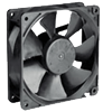
Macs Fan Control helps users understand and adjust cooling without digging through hidden settings. Built for machines that run hot, stay noisy, or need closer thermal checks, it brings fan speed monitoring and temperature sensor tracking into one utility. The software is useful for comfort, stability, and awareness during demanding workloads.
Macs Fan Control also gives users handling through custom RPM control and sensor-based fan rules. It suits people who want to reduce noise, react to heat faster, or keep older hardware easier to manage. Instead of a broad tune-up suite, it focuses on cooling behavior and practical device feedback.
Macs Fan Control works best when users need quick thermal awareness and careful cooling changes. Its menu bar display keeps fan speed or sensor values visible, while the two-panel sensor view separates fans from temperature readings. Setup feels direct, but the tool expects users to understand what they are changing. Pushing fans too low can create heat issues, so cautious settings matter for safer use.
How fan control helps manage heat
From there, daily use becomes more flexible because fan presets let users switch cooling behavior based on workload, noise needs, or hardware condition. S.M.A.R.T. drive readings also help track storage temperatures, which is useful after upgrades or repairs. Compared with iStat Menus, TG Pro, or smcFanControl, this utility stays focused, though those alternatives may offer broader monitoring, alerts, or simpler controls.
Performance is generally light because the app focuses on cooling data instead of background cleanup tasks. The autostart option helps users keep monitoring active after login, and automatic fan restoration returns fans to default behavior when the app closes. That safety net is helpful, yet users still need discipline. Overly aggressive settings can increase noise, wear fans faster, or hide deeper hardware problems that need repair.
Useful cooling control for careful users
Macs Fan Control is a useful pick for users who want clearer heat awareness and more direct cooling behavior. It is not a casual one-click optimizer, and careless settings can cause noise or heat problems. For users who understand their hardware and need steady temperature checks, it offers focused value, simple control, and practical support for keeping supported systems running comfortably during heavier everyday work sessions.
Pros
- Makes heat easier to track
- Offers direct cooling control
- Helps reduce unwanted noise
- Runs with a focused purpose
Cons
- Requires careful settings
- Can increase fan noise
- May hide hardware issues
- Not for casual optimization