File Commander for Windows
- By Cinnamonsoftware
- Free
- 1.3.0.0
Related software
Total Commander
What is Total Commander?
Total Commander Ultima Prime
Enhanced File Management with Total Commander Ultima Prime
Total File Commander Pro
Total File Commander Pro: Streamlined File Management for Windows
One Commander
One Commander: Powerful File Manager Replacement
oMega Commander
Comprehensive File Management with oMega Commander

Commander
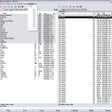
Commander is a file management utility and image viewer. The app has a recognizable split screen interface with two directory views or a directory view and a file viewer. Commander lets you auto scale and enhance images. You can also compare directory contents, use automatic rule-based file renaming and use keyboard short-cuts compatible with Norton Commander. The app allows you to search for identical files by name, size, time-stamp and/or contents. It even comes with an advanced pocket calculator with equation solver! Key Features Include: Easy interface for copying and moving files/folders. Directory contents size overview. Extract files from RAR and ZIP archives and compress to ZIP. FTP client. Text and hex file viewer. View CR2, BMP, WMF, EMF, JPEG, PNG, MNG, GIF, PCX, ICO, CUR and HIPS images. Search for nearly identical image files. Keyboard short-cuts compatible with Norton Commander. Compare directory contents. Commander provides you with the ability to view your images and manage your files within a simple interface. The app is very user friendly and has a few cool features. If MeeSoft Image Analyzer is installed, then you also have support for JPEG 2000, TIFF, RAS, PNM, PGM and PPM images.
Explorer Commander
Explorer Commander: Free File Manager for Windows
WinNC
Manage Files the Easy Way with WinNC

Multi Commander
program
Dragon UnPACKer
Useful tool for game file extraction
Sky Commander
Sky Commander: A Windows File Manager Replacement
Alt Commander
Effortless File Management with Alt Commander