
Architectural clarity for file systems
DIRlist is a specialized utility from WindowsUtilities that offers a streamlined solution for users who need to document complex folder structures. The program allows users to attach custom, free-text descriptions to individual files and subdirectories. Furthermore, the metadata is not temporary, as the annotations are saved into a local index.htm file within the specific directory. This ensures that the context of a file, such as its project phase or specific instructions, remains accessible even when viewed outside the application through a standard web browser.
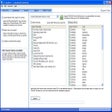
The program provides a clean, grid-based interface where files are initially presented in alphabetical order. Users can instantly reorganize their view by clicking on column headers to sort by size, date, or description. However, the program does not offer active file management features like moving, renaming, or deleting files within the application.
Customizable inventories and visual sorting
For users who only need to see specific data, DIRlist includes toggle boxes to hide or show file extensions and timestamps. Additionally, a built-in filter supports wildcard searches to allow users to isolate specific file types before printing. This level of granular control makes it a highly effective tool for creating instruction manuals or project documentation where file names alone may be insufficient.
Seamless documentation and web integration
With the program’s integration with web standards, DIRlist updates the local HTML index when a user exits the application or clicks the Print button, allowing the directory’s map to be shared with others who do not have the program installed. The interface uses clear visual cues, such as bolding subdirectories and identifying them with a DIR label in the size column, to make navigation intuitive. Because it functions as a lightweight, standalone application, it avoids the overhead of cloud-dependent management systems while providing a permanent, offline record of file contents.
A practical tool for directory documentation
DIRlist provides a dedicated space for descriptive labels and a path to export that data into a universal format like HTML to bridge the gap between a raw file system and a curated archive. Its browser compatibility allows directory listings and descriptions to be viewed in any web browser, and granular filtering includes a wildcard filter and toggle options to customize exactly which file details are displayed or printed.
Pros
- Permanent metadata
- Browser compatibility
- Granular filtering
Cons
- Local file footprint
- Limited to listing capabilities