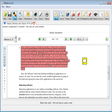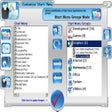
Customize Start Menu for Windows
- By Smartpctools
- Trial version
- 2.0
Related software
Start Menu 8
Start Menu 8 is a desktop customized utility for Windows users, that has been specifically designed to bring back the familiar Classic Start Menu to Windows 8/8.1 & Windows 10. The app offers a convenient and simple solution to freely switch between the latest Window 10 start menu and Windows Classic Start Menu. You can also choose from multiple start menus for Windows 7/Vista and Windows XP. It comes with an improved search engine, so you can quickly and easily access your apps and files directly from start menu. Start Menu 8 also affords you more customization with just a few clicks. It provides the options to skip the Modern UI & Welcome on Windows 8.1 and customize your taskbar any way you like on Windows 10. Overall, Start Menu 8 is neat little utility that has some nice features. It is lightweight, consumes negligible system resources, and best of all, it's free!
NiceTaskbar
Make Windows your own
Taskbar Transizer
Give your taskbar and start menu a transparent effect with Taskbar Transizer
Windows 8 Start Panel
The Windows 8 Start Panel and You
StartAllBack
Enhance Windows 11 with StartAllBack: Personalization Program Review
Bing Bar
How to Instantly Access Windows Bing
OblyTile
Customize Your Windows 8 Experience with OblyTile
Windows 8 Start Menu Toggle
Windows 8 Start Menu Toggle: A Free Desktop Customization Program for Windows
Start++
Enhancing the Vista Start Menu Experience
SystemTrayMenu
Efficient System Tray Utility for Quick Access
New Tab Page
How to Customize Your New Tab Page in Microsoft Internet Explorer 8
PDFedit
PDFedit - A Free Open Source PDF Editor