
技术规格
- 标题
- 下载 PDF Editor Mac 3 Mac
- 系统要求
- Mac OS X
- 语言
- 可用语言
- 英语
- 许可证
- 免费
- 最近更新
- 作者
- PDF to Word Converter
- SHA-1
ef0145e447392f42fd032af58c0f42ea776a08c1
- 文件名
- pdfeditormac.dmg
可用其他语言的程序
更改日志
目前 PDF Editor Mac 的 3 版尚无任何更新日志信息。有时候,发布者需要一些时间才能公布该信息,过几天再回来看看有无更新吧。
帮一下忙!
如果您有任何更新日志信息,希望与我们分享,我们非常乐意倾听!发送至 联系页面 联系我们吧。
探索应用








相关软件

Wondershare PDF Editor for Mac
全面的 PDF 编辑适用于 Mac 用户

PDNob PDF Editor for Mac
适用于Mac的全面PDF编辑解决方案

123 PDF Editor for Mac
对 Mac 上的 123 PDF 编辑器的全面评审
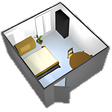
Sweet Home 3D for Mac
Sweet Home 3D for Mac是一个免费的室内设计应用程序,可以帮助您设计和规划房屋,办公室,工作区,车库,工作室或您能想到的几乎所有其他设计的建筑物。 Sweet Home 3D for Mac有一些非常好的功能,例如能够将家具放置在2D平面图中并在3D预览中查看家具。 主要功能包括: 通过鼠标或键盘以精确的尺寸绘制直的,圆形的或倾斜的墙。 在平面图中拖动门窗,将其插入墙中,Sweet Home 3D for Mac将计算墙孔。 从可搜索和可扩展的目录中将家具添加到计划中。 更改家具,墙壁,地板和天花板的颜色,纹理,大小,厚度,位置和方向。 设计2D房屋,并同时从空中角度查看3D房屋,或从虚拟访客角度进入房屋。 用房间面积,尺寸线和文字注释计划。 创建能够根据一天中的时间和地理位置控制日光效果的逼真的图像和视频。 导入家庭蓝图以在其上绘制墙,导入3D模型以完成默认目录,并导入纹理以自定义曲面。 以标准文件格式打印和导出PDF,位图或矢量图形图像,视频和3D文件。 使用Java编程的插件扩展Sweet Home 3D的功能。 多语言支持:25种语言。 总体而言,Mac版Sweet Home 3D是入门3D设计的出色应用程序。它易于使用,并具有直观的用户界面。 3D漫游解决方案非常出色,并且有很多家具可供选择。您甚至可以创建圆形房间!该应用程序具有良好的自动恢复功能,以防Sweet Home 3D崩溃。

Falcon PDF - Editor & Tools
使用 Falcon PDF 进行全面的 PDF 编辑

Processing for Mac
Processing for Mac is a programming language and environment built for the electronic arts and visual design communities. It was created to teach fundamentals of computer programming within a visual context and to serve as a software sketchbook. Key Features Include: Interactive programs with 2D, 3D or PDF output. OpenGL integration for accelerated 2D and 3D. X-Platform for GNU/Linux, Mac OS X, and Windows. Over 100 libraries extend the core software. Processing for Mac is a flexible software sketchbook as well as a language for learning how to code within the context of the visual arts. There are tens of thousands of students, artists, designers, researchers, and hobbyists who use Processing for Mac for learning and prototyping. The software exports Java applets which may be posted on the Internet and shared with other artists and designers.

Scribus for Mac
Scribus for Mac is a free DTP app, which gives you a useful variety of tools with which you can complete all manner of various projects. It comes packed with preloaded templates or you can create your own document from scratch. The template options you are presented with are professional looking and can be utilized well. Whether you're creating brochures, business cards, newsletters, PDF presentations or posters, you have several different styles to choose from. The interface is easy to get to grips with; simply choose a template and start working. All the main tools that you will need are efficiently arranged across the top of the doc window. There are some measurement markings on all sides of the window that enable you to check your formatting and alignment with a quick glance. The app also comes with a lot of support options to help you get the best results from your work. There is an enthusiastic and friendly community around Scribus for Mac that assists beginner and pro alike, via the mailing list, IRC channel, wiki, contracted support, and the bug-tracker. Overall, Scribus for Mac gives you a fluid and efficient way to create all kinds of documents. It is pretty powerful for a free, open source DTP app, with some professional features, such as CMYK color, spot color, separations, ICC color and robust commercial grade PDF. Looking for the Windows version of Scribus for Mac? Download Here
PDF Editor Pro
PDF编辑器专业版的综合评审

Master PDF Editor
Master PDF Editor:高效的 PDF 编辑工具,适用于 Mac

Foxit PDF Editor
Foxit PDF 编辑器的深入评测(适用于 Mac)

Tiny PDF Editor
Mac上Tiny PDF编辑器的全面评审

PDFelement 6 - PDF Editor
使用 PDFelement 6 进行全面的 PDF 编辑
最新更新
Typora
Typora - 搜索引擎优化工具

PDF Converter OCR
高效的 PDF 转换与 OCR 技术

Microsoft Word
Microsoft Word for Mac:在您的Mac设备上提升您的生产力

WordCraft
WordCraft:一个全面的 Mac 办公套件

DeckCraft
使用 DeckCraft 简化演示文稿创建

QQ Music
轻松地通过 QQ 音乐流媒体音乐

HopToDesk
全面的 Mac 远程控制解决方案

Toribash
独特的回合制战斗体验

FreeCAD
全面的 CAD 工具为设计师

UU Remote
使用 UU Remote 高效远程桌面访问

CodeLite
多种编程语言的综合IDE
Roblox
免费游戏平台