Changes Mac 版
- 由 Changesapp
- 试用版
- 1.5.6
相关软件
Keynote
Keynote is an easy to use and yet very powerful presentation software, designed by Apple. The Keynote software provides you with a massive array of tools and effects to ensure your presentations stand out from the crowd. It can be used for home, academic and business presentations. There are over 30 Apple-designed themes to choose from. The visual effects are simply stunning to use. When combined with graphics, transitions and images, you can create high quality presentations with a fresh look. Using Keynote you can create amazing presentations both quickly and easily. The software uses a simple drag and drop interface with a clean and well designed format panel and toolbar. Keynote automatically saves your presentation as you make changes and with iCloud you can access and edit your work from your Mac, iPad, iPhone, iPod Touch and iCloud.com. You can import a varied range of media types including; JPEG, TIFF, PNG, PSD, EPS, PDF, AIFF, MP3, AAC, and MOV. When you have created you masterpiece, you can export your presentations to Microsoft PowerPoint, PDF, QuickTime, HTML and image files. You can then share as Movie to Facebook, Vimeo, and YouTube. Main Features: Get Started Quickly Easy To Use Graphics Tools Cinema Quality Animations Share Your Work Easily As Apple says: Keynote. Your presentation. Totally decked out.
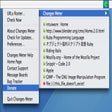
Changes Meter
使用 Changes Meter 进行高效的 URL 监控

Dropbox
Dropbox for Mac is an incredibly useful file storage and sharing program. Because it is cloud-based, you can access your Dropbox files from practically any device with an internet connection. This page refers to the install of Dropbox for Mac, though it can also be accessed from the web, Windows install, and iOS, Android, Google and Windows apps. With Dropbox for Mac, you can store all your files and access them from anywhere. Your changes will automatically sync across all your devices, so you'll always have access to the latest version of your files. Key features include: Cloud-based file storage. Cross-platform compatible. Easy file sharing. Secure encryption. Automatic sync. Seamless app integration. Security features. Business and individual accounts. Advanced features. Access your files anywhere, anytime. Free version. Whether you're working alone or as part of a team, you'll be able to store, share and collaborate on your files as and when you want to. Dropbox for Mac has a range of individual and business plans to choose from if you're looking for more than the standard free document storage solution. Dropbox for Mac's paid plans unlock a heap of advanced features to optimise your workflow. Dropbox Business plans give you Paper, a collaborative workspace for your team, while Showcase allows you to turn your files into a beautifully packaged page to share with clients, colleagues, and more. Overall, Dropbox is one of the most popular and recognisable cloud storage services available. It integrates seamlessly with a range of everyday tools to improve your workflow, and paid plans unlock a great range of advanced features for businesses and individuals. Looking for Dropbox for Windows? Find it here. Check out more of the best Mac software to get you organised.

X-VPN for Mac
In a climate where data breaches and misuse are a common subject in the news, protecting your personal data online has never been more important. X-VPN for Mac provides top of the line, iron-clad tools that ensures your data remains your own. X-VPN for Mac unblocks geo-restricted streaming services allows users to continue watching all their favourite content whilst abroad. X-VPN for Mac provides a fast and stable connection with unlimited bandwidth for all users. Hassle free and easy to use, it only takes 3 seconds to connect to one of 3000+ servers across the globe. Key features include: Fast and stable connection. 24/7 support. Unlimited bandwidth. 3000+ servers worldwide. 256-bit encryption. Unblock streaming sites. No pop-up ads. Access Geo-blocked Contents. No throttling. X-VPN for Mac has a reputation for delivering strong and reliable 256-bit encryption which means your ISP, government, and hackers will not be able to access your internet data. At the same time, X-VPN for Mac changes your IP address which further enhances your online anonymity. X-VPN for Mac is a great VPN service that allows you to access the web securely, privately and anonymously on your Mac. It is designed for macOS 10.10 and later, and is compatible with Macbook, Mac Air, iMac and Mac mini. Overall, X-VPN for Mac is a very robust and secure VPN service that ensures your data is kept anonymous and safe.
Quick Change
在Mac上轻松管理文件类型

PMD for Mac
PMD for Mac is a source code analyzer. It finds common programming flaws like unused variables, empty catch blocks, unnecessary object creation, and so forth. It supports Java, JavaScript, XML, XSL. Available Plugins include: Maven PMD. Eclipse. NetBeans. JBuilder. JDeveloper. IntelliJ IDEA. PMD for Mac additionally includes CPD, the copy-paste-detector. CPD finds duplicated code in Java, C, C++, C#, PHP, Ruby, Fortran, JavaScript, PLSQL, Apache Velocity, Scala, Objective C, Matlab, Python, Go.

Koala for Mac
Koala for Mac is a GUI application for Less, Sass, Compass and CoffeeScript compilation, to assist web developers to use them more efficiently. Koala is a cross platform application that can run on Windows, Linux and Mac OS. Key features include: Support for Less,Sass, CoffeeScript and Compass Framework. Multi-language Support. Real-time Compilation. Compile Options. Error Notification. Cross-platform. Koala for Mac is a great GUI compiler for pre-processing languages, and currently it supports Less, Sass, Compass, and CoffeeScript out of the box. It has real-time compilation, which means that Koala for Mac looks for any file changes, and compiles them automatically; everything is running in the background without user action. Koala for Mac can also automatically compress code after compilation has been completed. If, however, Koala for Mac encounters an error during compilation, it will display an error message. The Koala for Mac application has built-in compiler components that can be directly used after installation. The Sass compiler function needs a system with Ruby installed, but, if you’re using OS X, you’ll already have Ruby installed, and Koala for Mac has built-in Ruby on the Windows version anyway. To begin using Koala for Mac simply add a project by dragging and dropping a folder into the window, or click on the plus icon in the top left corner and select your project folder.

Total War: Warhammer III - Shadows of Change
在《全面战争:战锤 III》中扩展战场

Minecraft: The Update that Changed the World
Minecraft 更新:对玩家来说的游戏改变者

Shotcut for Mac
Shotcut for Mac is an open source, cross-platform video editor with a wonderfully sleek, intuitive interface. With Shotcut for Mac you work with numerous panels that can be docked and undocked as you see fit. Viewable information includes details regarding media properties, an encoding panel, filter panel, and a jobs queue. You can also see recent files, view playlists with a thumbnail view and see recent search history. It even supports drag and drop functionality from file manager. Key Features include: Wide format support. 4K resolution support. Audio mixing across all tracks. Video compositing across video tracks. Intuitive interface. Shotcut for Mac has superb support for wide format media including hundreds of audio and video formats and codecs thanks to FFmpeg. Working with Shotcut for Mac is really easy; you have all the information, tools and functions that you need to produce quality material. It supports native editing, it has multi-format timelines, and it gives you data on resolutions and frame-rates within the project that you are working on. Shotcut for Mac also has some really neat device options. With Blackmagic Design SDI and HDMI support for media input. You can input media from your screen, webcam and various audio capture devices as well. System requirements: Intel, 64-bit processor, OS X 10.6.8 or later. Looking for the Windows version of Shotcut for Mac? Download Here

A Change of Heart: A Magical Girl Adventure
引人入胜的魔法冒险与动作元素

CorelCAD 2019 for Mac
CorelCAD for Mac brings industry-standard CAD features, precise 2D drafting and 3D design tools, and advanced .DWG file support at an affordable price*. The app allows you to open, edit and share files in .DWG format for easy collaboration. You can communicate your ideas with precision using customizable 2D drafting and 3D design tools and you can experience immediate productivity in an environment filled with industry-standard features such as the Ribbon UI and enhanced layer tools. Key Features include: High-performance CAD engine. Industry-standard tools. Precise and comprehensive 2D drafting and 3D design tools. Advanced .DWG file and CorelDRAW graphics support Access and re-purpose your design assets from within the new Design Resources Flexible options to customize and automate for PC and Mac. CorelCAD for Mac has some cool new features over the previous version, including new drawing tabs that allow your workflow to stay more organized by including the ability to open connecting folders from within the current drawing windows. There are also enhancements to 2D editing tools, and an enhanced, customizable ribbon. This new ribbon provides you with a way to improve your productivity by selecting and implementing the various design tools that CorelCAD for Mac has to offer. Some new features of CorelCAD for Mac worth mentioning are the new Head-Up Display toolbar, and the new Quick Input tools. By using the new toolbar you can select various entities and then zoom in on them to make required changes. With the ability to edit your entities in one place, you can set the line style and line width, change layers, create dimension entities or make a Block. With the new Quick Input tools you can establish a command interface directly in your project by using the cursor in the drawing area. This is an efficient and time-saving feature. When you move the cursor, the tool-tips can track and enable you to input coordinate positions, lengths, angles, and lines where you need them to be. Overall, CorelCAD for Mac is an industry standard application that has an impressive array of features, it is compatible with all major CAD apps, and it uses a smart and intuitive interface. *This is a 30 day trial, with some reduced functions.