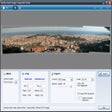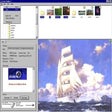
Zoom Studio Windows 版
- 由 Inzomia
- 试用版
- 2.20
相关软件
Snap Camera
网络摄像头上的 Snapchat 镜头
Voicemeeter
易于使用的混音器
Synfig Studio
Synfig Studio is a free, Open Source 2D vector and timeline-based animation application. You can use Synfig Studio to create feature-film-quality animation, web animations and advertisements. Key Features Include: Spatial resolution-independence: Most elements are vector-based and all layers are parametrically generated, hence even when changing the target resolution of a project, the only pixelation will occur in imported raster images, not the built-in components. Temporal resolution independence: Animation-keyframes are automatically interpolated by the computer, resulting in smooth motion. High Dynamic-Range Imaging: By using floating-point math in the image calculations, HDRI processing allows canvases to internally understand a far greater range of pixel luminance, resulting in better lighting effects, and improved color composition. Pentablet-friendly tools: The draw tool already reads the pressure sensitivity channel off your favourite tablets, for natural line weighting, and more to come! Artist-oriented design: Synfig has been designed from the ground up with animation workflow in mind. Path-based Gradients: Synfig has full support for gradient paths - gradients that follow along a drawn shape. This allows artists to easily add soft shading to animation without the trouble of painting it onto every frame. Layers: Synfig supports a multitude of layers of various types; geometric, gradients, filters, distortions, transformations, fractal and a few others. Synfig Studio is a feature rich application that has numerous features including High Dynamic-Range Imaging (HDRI) and artist-oriented design and path-based gradients.
FineShare FineVoice
多功能语音转换器满足多媒体需求
Soft4Boost Photo Studio
Soft4Boost Photo Studio allows you to edit, fix, crop and rotate your photos. You can use various editing tools to fix photos, adjust color balance, brightness and contrast,apply pre-made effects and also remove tiny defects using the Retouch tool. Soft4Boost Photo Studio supports various image formats including JPEG, BMP, and GIF. The application provides you with numerous editing techniques at your fingertips. You can remove red eye effect, adjust colour saturation. Amend object shapes and improve the overall quality of your images. Soft4Boost Photo Studio allows you to crop, rotate, and zoom images. You can adjust color parameters like balance, brightness, contrast and saturation. Reduce image noises and use the de-blur tool feature to sharpen or soften object shapes. If you don't want to do too much editing manually you can select a set of pre-made effects to give the illusion that your pictures look like old faded photographs or create stylish monochrome black-and-white pictures. Soft4Boost Photo Studio is also skinnable with 11 different skins to choose from. It also has multi-language support and is available in English, Danish, German, Russian, French, Spanish, Italian, Hungarian and Turkish.
SparkoCam
使用 SparkoCam 将您的相机转换为网络摄像头
LINE
LINE allows you to share photos, videos, voice messages, contacts and your location information easily with your friends. You can get the latest news and special coupons for popular artists, celebrities,brands and TV shows. With LINE you can exchange free instant messages with friends whenever and wherever you like, with one-on-one messaging and group chats. LINE is available on all popular smartphone devices:iPhone, Android, Windows Phone, Blackberry and even on your PC. KEY FEATURES INCLUDE LINE Stickers: More fun and expressive chats, with over 10,000 stickers and emoticons. Timeline:Use Timeline to share texts, photos,videos, and stickers to exchange stories with your close friends. Snap Movie:Create top quality videos in just 10 seconds! You can add cool background music and share with friends. Add friends easily: Quickly add friends using the "Shake It!" function, a QR code, or a LINE ID. Looking for the Mac version of Line? Download it here.

Google Chrome
Google的顶级免费浏览器
Betternet Free VPN
Betternet是Windows专用的VPN,没有广告,也没有注册。 Betternet允许您匿名浏览Web,而不必担心被政府或ISP跟踪。您的IP将被更改,并且没有人可以跟踪您在Internet上的活动。 主要功能包括: 它是永远免费的。 它支持Windows 10、8.1、8、7。 无需信用卡。 无需注册或登录。 没有保存任何用户的日志。 简单的一键式连接。 它将您连接到最快的服务器。 Betternet使您可以访问所在国家/地区,学校或工作地点中整个被阻止的网站。您可以取消阻止Facebook,Twitter,Youtube和其他社交网络,并绕过政府的审查制度。 当您连接到公共wifi热点,蜂窝数据网络和其他公共场所时,Betternet可以保护设备的连接。 它就像免费代理一样工作,但更加安全。您的密码和个人数据受到保护,并且免受黑客攻击。 Betternet速度很快:它会自动检测您的位置并将您连接到最近的服务器;结果,您的连接将比其他提供商快得多。
Zoom Player Max
Zoom Player Max是适用于Windows的灵活,复杂的媒体播放器。它基于“智能播放”技术,这意味着您可以以更高的稳定性,更高的性能和更少的麻烦来播放更多的媒体文件。 由于易于使用,Zoom Player Max适用于每个用户级别,但是高级播放和自定义选项也使其非常适合高级用户。 Zoom Player Max支持广泛的文件格式,包括蓝光和4K,甚至可以播放不完整的AVI文件以及被第三方程序锁定的文件。 主要功能包括: 视频和音频播放。 “智能播放”技术。 高性能媒体播放。 提高了稳定性。 直观的界面。 音频均衡器。 色彩控制。 支持蓝光。 屏幕截图功能。 点唱机模式。 YouTube整合。 几个高级自定义选项。 从音频播放创建铃声。 播放历史。 字幕支持。 30天免费试用。 如果您正在寻找可定制的媒体播放器,那就别无所求。 Zoom Player Max为您提供了自定义鼠标手势,皮肤,界面面板和菜单的广泛选项。您也可以选择自定义背景图像,以在什么都没有播放或没有关联的图像文件夹的音频文件播放时显示。 如果您想要流畅的媒体播放体验,则Zoom Player Max很棒。借助Smart Play技术,您将体验到更高的稳定性和更高的性能,而不会降低速度。音量均衡器和色彩控制将确保您播放音乐和视频时无需担心。 总体而言,Zoom Player Max是Windows Media Player的绝佳选择。它为您提供了广泛的自定义选项,并确保流畅的播放体验,不会降低您的速度。免费试用30天,何不亲自尝试一下Zoom Player Max。 这是Zoom Player Max的30天免费试用。 在这里找到免费的Zoom Player。
Zoom Player Free
Zoom Player Home是Windows版Zoom Player Max媒体播放器的免费版本。它是基于“智能播放”技术的灵活媒体播放器,可让您播放更多媒体文件,并具有更高的稳定性,更好的性能和更少的麻烦。 Zoom Player Home易于使用,每个人都可以享受直观的界面。通过高级播放和自定义选项,Zoom Player Home比标准媒体播放器具有更大的灵活性。它支持多种文件格式,甚至可以播放不完整的AVI文件以及被第三方程序锁定的文件。 主要功能包括: 视频和音频播放。 “智能播放”技术。 快速加载。 高性能媒体播放。 提高了稳定性。 直观的界面。 音频均衡器。 色彩控制。 屏幕截图功能。 高级自定义选项。 字幕支持。 免费的媒体播放器。 使用Zoom Player Home,您可以通过一些创造性的方式自定义媒体播放。您可以通过预设和自定义速度选择来更改播放速度,并选择适合您的宽高比。它甚至可以为您提供自定义外观,以丰富您的界面,并通过高级鼠标控件为您提供灵活性。 Zoom Player Home可为Windows PC打造出色的视频播放器。它允许您从DVD,硬盘驱动器或网络连接播放电影。设置书签以跳到您喜欢的场景,并自动记住在恢复DVD时您离开的地方。 总体而言,Zoom Player Home是一款出色的具有灵活性的免费媒体播放器。它在用户友好和直观的界面内为您提供了一系列自定义功能。使用免费的Zoom Player Home享受强大的媒体播放。 查阅File Player评估Zoom Player Home Free。 尝试使用Zoom Player Max以获得更好的媒体播放体验。
Nexus
The Winstep Nexus Dock is a FREE professional dock for Windows. With Nexus, your most frequently used applications are only a mouse click away - and Nexus turns working with your computer into a fun and exciting experience. The Nexus dock provides one-click access to frequently used applications, folders and documents. Main features: Display running applications on the dock with task grouping, filtering and icon customization options. Display system tray on the dock as single or grouped icons. Blur-Behind and colorization of dock backgrounds. Monitor active connections and bandwidth usage with Net Meter module. Get weather forecast for over 39,000 cities world-wide. Multiple mouse over effects: zoom, swing, bounce and more! Live icon reflections and animated water-like effects for reflections and dock backgrounds. Easily change appearance of icons of running programs and shortcuts by drag & dropping PNG, ICO and TIF files directly into the icon. Multi-monitor support. Compatible with skins for all 3rd party docks.